UX/UI case study
UX/UI case study
/
2024
2024
Work Order
Work Order
- Mayank Kaushik
- Mayank Kaushik
|
Product Designer
Product Designer
This case study showcases my end-to-end design process, from research to final execution and outcomes.
This case study showcases my end-to-end design process, from research to final execution and outcomes.
About the project
About the project
What is
What is
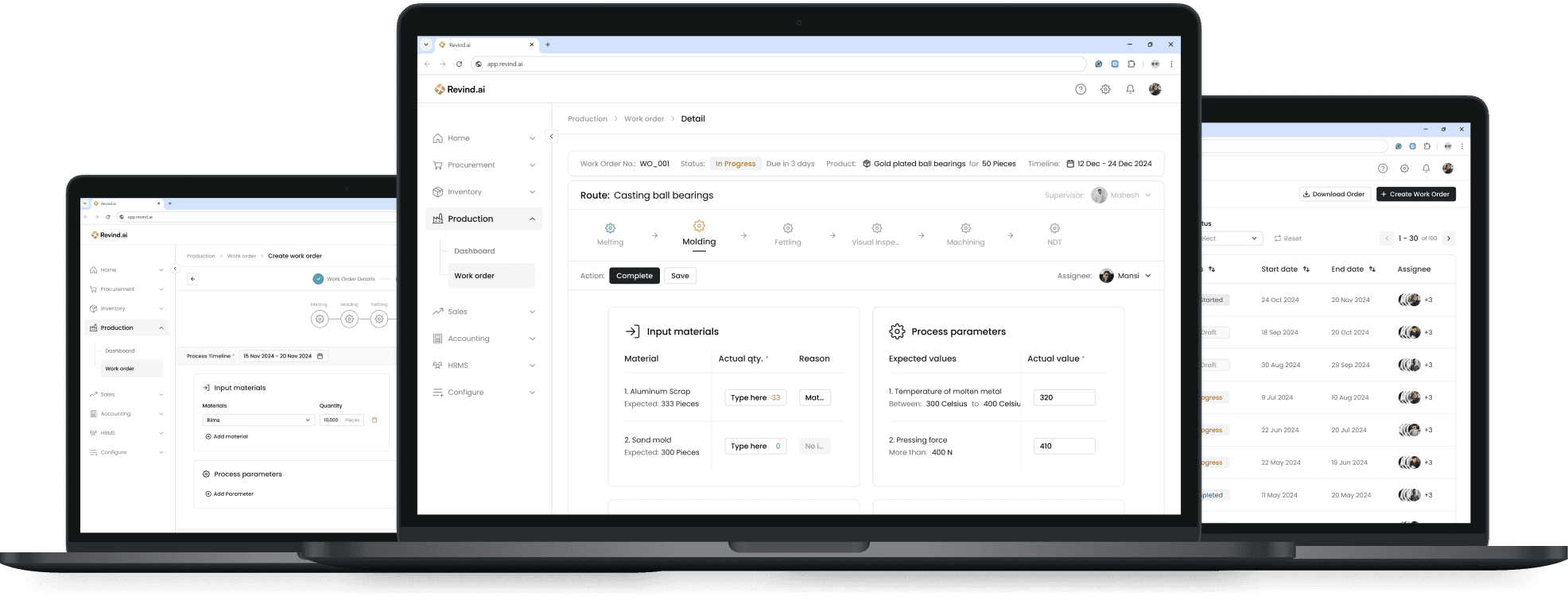
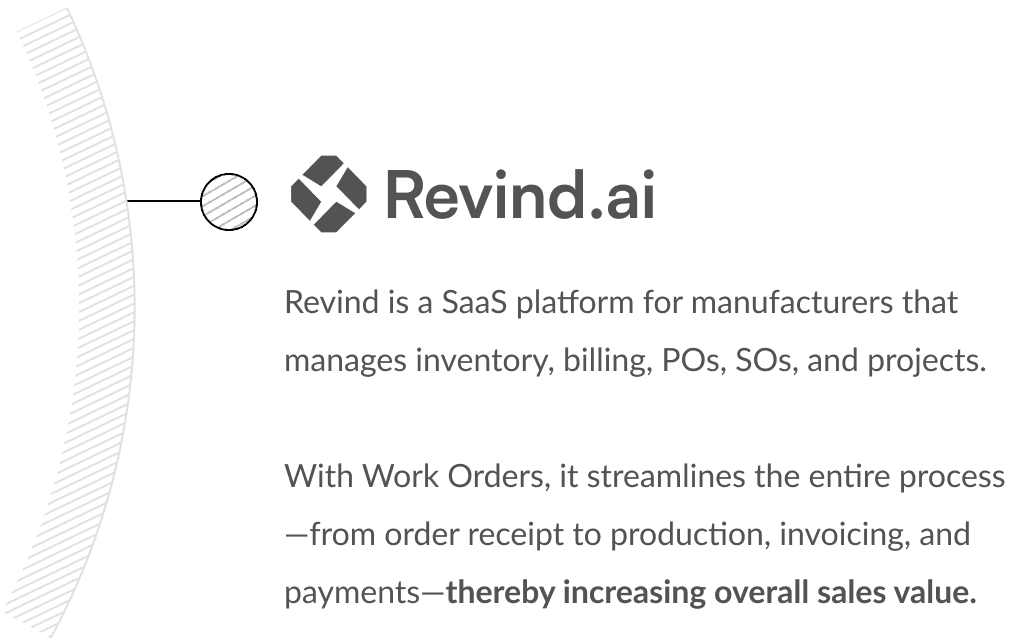
Revind is a B2B SaaS tool built for manufacturers. It helps them manage everything—from inventory and orders to raising RFQs and tracking production. With Revind, manufacturers can handle the entire process, starting from enquiries all the way to finished goods, in one easy-to-use platform.
Revind is a B2B SaaS tool built for manufacturers. It helps them manage everything—from inventory and orders to raising RFQs and tracking production. With Revind, manufacturers can handle the entire process, starting from enquiries all the way to finished goods, in one easy-to-use platform.
Challenges
Challenges
Manufacturing supervisors were losing 20–40 minutes daily managing work orders through fragmented tools and manual coordination.
The existing workflow caused production delays, task duplication, and lack of real-time visibility across teams.
What are we trying to solve?
What are we trying to solve?
Production is a major challenge for manufacturers, requiring planning, resource allocation, and labour management. Tracking ongoing work often becomes difficult.
We aimed to design a centralized work order system that reduces coordination friction and improves operational clarity.
Success Criteria
Reduce work order creation time
Minimize production errors due to unclear task assignments
Improve real-time visibility of task status
Increase supervisor adoption rate
Project Type
UI UX Design
SaaS Tool
Project Timeline
7 Weeks
March - April 2024
Team
1 Manager
1 Designer
1 CTO
3 Developers
Project Type
UI UX Design | SaaS Tool
Project Timeline
7 Weeks | March - April 2024
Team
1 Manager | 1 Designer | 1 CTO | 3 Developers
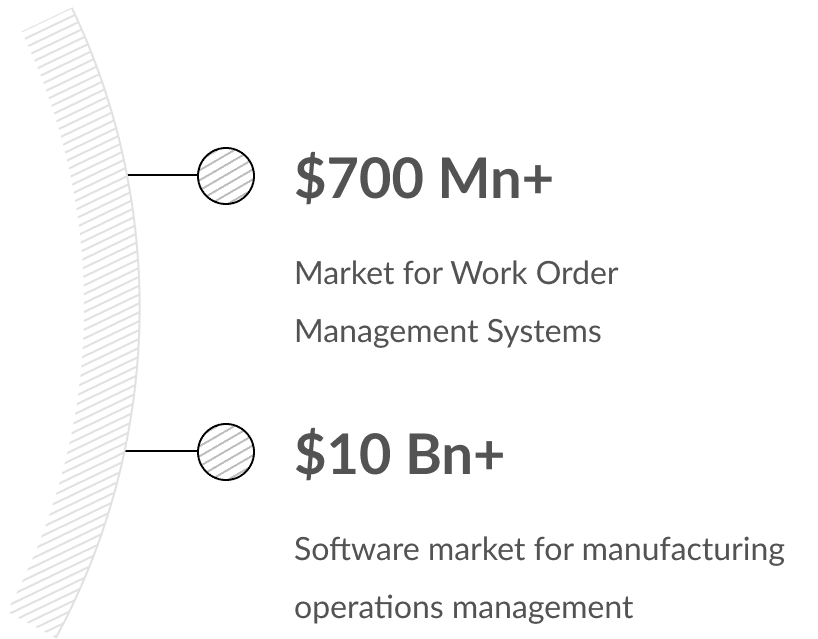
How is it beneficial for business?
How is it beneficial for business?
What I accomplished?
What I accomplished?
Identified a simpler design approach for creating complex production plans.
Identified a simpler design approach for creating complex production plans.
Designed solutions for key pain points like planning, tracking production, and managing resources.
Designed solutions for key pain points like planning, tracking production, and managing resources.
Collaborated with managers and led design handoffs to developers to ensure the final outcome met requirements and solved user needs.
Collaborated with managers and led design handoffs to developers to ensure the final outcome met requirements and solved user needs.
Research
Research
Where are we today?
Where are we today?
Before solving, it was cruicial to understand how this feature will fit inside Revind, i.e how well should it be interacting with other modules to provide the desired experience. What were the base line expectations of users and the business. So I sat with our VP, Manager and CTO to figure this out.
Research Method
Research Method
5 supervisor interviews
3 shop-floor worker shadowing sessions
3 shop-floor worker shadowing sessions
Workflow audit of current Excel + manual system
Workflow audit of current Excel + manual system
Key Insights
Key Insights
Supervisors manually cross-check inventory before assigning tasks.
Workers rely on verbal instructions when system data is unclear.
Workers rely on verbal instructions when system data is unclear.
Lack of status visibility causes repeated follow-ups.
Lack of status visibility causes repeated follow-ups.
What do the users need?
What do the users need?
“Creating work order is a hassle, it would be nice if it can be made a bit easier”
“Creating work order is a hassle, it would be nice if it can be made a bit easier”
Creating a simple UX for creation of work order
Creating a simple UX for creation of work order
“My workers often miss on some crucial parameters like temperature that can hinder the product quality”
“My workers often miss on some crucial parameters like temperature that can hinder the product quality”
Capturing and displaying of requirements for workers
Capturing and displaying of requirements for workers
“I want full visibility on what is going on with the order”
“I want full visibility on what is going on with the order”
Live tacking of work orders
Live tacking of work orders
“As a worker I want to see the tasks assigned to me, so that I can finish them in order ”
“As a worker I want to see the tasks assigned to me, so that I can finish them in order ”
Task list for workers to view their work schedules
Task list for workers to view their work schedules
Analyzing the current solutions
Analyzing the current solutions

Microsoft Excel
19 out of 50 manufacturing companies used Excel, but these were mostly small-scale factories with at most one or two warehouses.
19 out of 50 manufacturing companies used Excel, but these were mostly small-scale factories with at most one or two warehouses.
Pros
Pros
Very easy to use.
Requires minimal user training.
Low cost.
Very easy to use.
Requires minimal user training.
Low cost.
Cons
Cons
Not suitable for scaling.
Difficult for users to understand and navigate.
Requires downloading and sharing files, which creates major hassle.
No support for tracking.
Not suitable for scaling.
Difficult for users to understand and navigate.
Requires downloading and sharing files, which creates major hassle.
No support for tracking.

Legacy ERPs
31 out of 50 manufacturing companies used Excel. These were the ones operating factories with more than two warehouses.
31 out of 50 manufacturing companies used Excel. These were the ones operating factories with more than two warehouses.
Pros
Pros
Can be customized for each company.
Secure, as it is mostly hosted on local servers.
Can be customized for each company.
Secure, as it is mostly hosted on local servers.
Cons
Cons
Very outdated UX and UI.
Scaling requires contacting support and paying extra costs.
Difficult to train new users.
More expensive than Excel.
No updates, resulting in no improvements over time.
Very outdated UX and UI.
Scaling requires contacting support and paying extra costs.
Difficult to train new users.
More expensive than Excel.
No updates, resulting in no improvements over time.
What does the business need?
What does the business need?
Goal 1:
Goal 1:
Improved workflow for production
Improved workflow for production
Goal 2:
Goal 2:
An attractive UI for clients
An attractive UI for clients
Goal 3:
Goal 3:
Easy to learn flow
Easy to learn flow
Goal 4:
Goal 4:
Faster and efficient production planning
Faster and efficient production planning
Key takeaways
Key takeaways
The users
The users
Make work orders easier, ensure crucial parameters aren’t missed, provide full visibility, and give workers clear order tasks to complete.
Make work orders easier, ensure crucial parameters aren’t missed, provide full visibility, and give workers clear order tasks to complete.
The business
The business
Improved production solution with attractive UI and efficient, easy planning. So we have increased sales and happy clients.
Improved production solution with attractive UI and efficient, easy planning. So we have increased sales and happy clients.
Define
Define
Meet the production supervisor
Meet the production supervisor
Understanding your users is one of the most important steps when starting the design process. Based on the research and interview details provided, I created two personas: one for the Production Supervisor and another for the Workers.
Production Supervisors are responsible for creating production plans and assigning daily tasks to workers, while the workers’ main role is to complete these tasks within the given timelines and report back to the supervisor.
I’ve attached the supervisor’s persona, as they are the most important users of the app.
Understanding your users is one of the most important steps when starting the design process. Based on the research and interview details provided, I created two personas: one for the Production Supervisor and another for the Workers.
Production Supervisors are responsible for creating production plans and assigning daily tasks to workers, while the workers’ main role is to complete these tasks within the given timelines and report back to the supervisor.
I’ve attached the supervisor’s persona, as they are the most important users of the app.
Mahesh
45 yo
45 yo
From Karnataka
From Karnataka
Production Supervisor
Production Supervisor
Bachelor’s Degree
Bachelor’s Degree
“A work order should guide workers clearly, but this ERP make it difficult for me to create one and for workers to execute it.”
“A work order should guide workers clearly, but this ERP make it difficult for me to create one and for workers to execute it.”
Goal
Goal
Plan work orders
Track product specifications
Manage resources
Worker task planning
Track task status
Plan work orders
Track product specifications
Manage resources
Worker task planning
Track task status
Needs
Needs
A tool with better UI and UX for production planning
Quickly access the progress made on the tasks
Better visibility on resources to plan ahead
Maintain communication and alert workers for any updates
A tool with better UI and UX for production planning
Quickly access the progress made on the tasks
Better visibility on resources to plan ahead
Maintain communication and alert workers for any updates
Pain Point
Pain Point
Planning and creating production plans takes too much time
Process operating guidelines are hard to communicate
Task progress in not clearly tracked
Resource can mess due to low context on availability
Planning and creating production plans takes too much time
Process operating guidelines are hard to communicate
Task progress in not clearly tracked
Resource can mess due to low context on availability
Description
Description
Rajesh, 45, is a Production Supervisor managing shop-floor activities. He ensures teams meet targets, monitors processes, supports operators, and resolves issues in real time. He relies on reports for planning, but discrepancies can slow production.
Rajesh, 45, is a Production Supervisor managing shop-floor activities. He ensures teams meet targets, monitors processes, supports operators, and resolves issues in real time. He relies on reports for planning, but discrepancies can slow production.
Mahesh’s journey and how to improve it?
Mahesh’s journey and how to improve it?
Existing flow
Receives purchase order document via email
Goes through product details
Collects requirements
Sketches a plan
Looks for available workers
Assigns task to workers
Tracks regular progress
Existing flow
Receives purchase order document via email
Goes through product details
Collects requirements
Sketches a plan
Looks for available workers
Assigns task to workers
Tracks regular progress
Targeted flow
Opens Revind App
Goes to Work orders
Selects order to be produced
Sketches a plan
Tracks progress
Targeted flow
Opens Revind App
Goes to Work orders
Selects order to be produced
Sketches a plan
Tracks progress
How might we get here?
How might we get here?
Addressing business needs
Addressing business needs
Goal 1:
Goal 1:
Improved workflow for production
Improved workflow for production
Provide a tool with production planning, execution and tracking functionality.
Provide a tool with production planning, execution and tracking functionality.
Goal 2:
Goal 2:
An attractive UI for clients
An attractive UI for clients
Use a modern and minimalist UI to make it look appealing.
Use a modern and minimalist UI to make it look appealing.
Goal 3:
Goal 3:
Easy to learn flow
Easy to learn flow
Keep the flow natural, staying as close to the actual production process as possible.
Keep the flow natural, staying as close to the actual production process as possible.
Goal 4:
Goal 4:
Faster and efficient production planning
Faster and efficient production planning
Keep form filling to a minimum, and auto-fill data wherever possible.
Keep form filling to a minimum, and auto-fill data wherever possible.
Discussion with the team
Discussion with the team

Brainstorming with people from different departments gave me a wide range of valuable perspectives. Together, we identified the most intuitive user flows, uncovered potential edge cases, and carefully narrowed down the list of features based on both user and business needs.
We finalized the features with the team to establish realistic and achievable goals within the defined timelines.
Brainstorming with people from different departments gave me a wide range of valuable perspectives. Together, we identified the most intuitive user flows, uncovered potential edge cases, and carefully narrowed down the list of features based on both user and business needs.
We finalized the features with the team to establish realistic and achievable goals within the defined timelines.
“We should build this just like factories, how they use conveyer belts for each process in sequence”
“We should build this just like factories, how they use conveyer belts for each process in sequence”
“We can break down the creation parts into multiple steps. It makes it feel less like a giant task”
“We can break down the creation parts into multiple steps. It makes it feel less like a giant task”
“All work orders should be visible at a glance to see the overall progress... like a list of them. Will be helpful for owners and supervisors”
“All work orders should be visible at a glance to see the overall progress... like a list of them. Will be helpful for owners and supervisors”
“Sometimes supervisors don’t have full context, so we should allow saving as drafts””
“Sometimes supervisors don’t have full context, so we should allow saving as drafts””
Final features list
Final features list
Keeping the users need in mind we finalized the list of features that not only solved for users pain points but also aligned well with business goals.
Keeping the users need in mind we finalized the list of features that not only solved for users pain points but also aligned well with business goals.
User Steps
User Steps
Opens Revind App
Opens Revind App
Goes to Work orders
Goes to Work orders
Selects order to be produced
Selects order to be produced
Sketches a plan
Sketches a plan
Tracks progress
Tracks progress
Business goal
Business goal
Attractive UI
Attractive UI
Easy to learn flow
Easy to learn flow
Faster and efficient production planning
Faster and efficient production planning
Improved workflow for production
Improved workflow for production
Faster and efficient production planning
Faster and efficient production planning
Improved workflow for production
Improved workflow for production
Features
Features
Work order module
Work order module
List of work orders
Intuitive create order button
List of work orders
Intuitive create order button
Step 1: Basic work order data
Step 1: Basic work order data
Step 2: The sequence of process to follow
Assign workers to each process
Adding process specifications
Step 2: The sequence of process to follow
Assign workers to each process
Adding process specifications
Details view of a live work order
Status tags
Details view of a live work order
Status tags
Design
Design
Key screens and Breakdown
Key screens and Breakdown
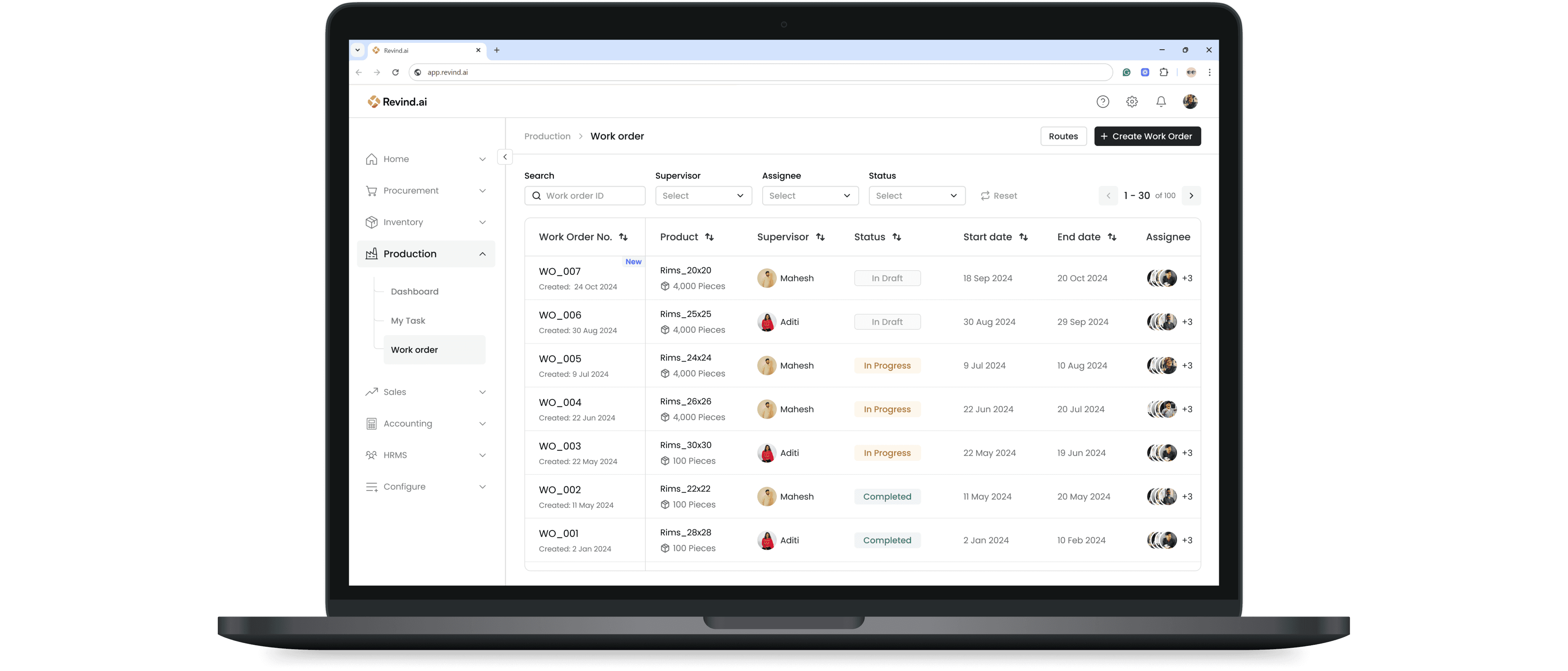
Work order List
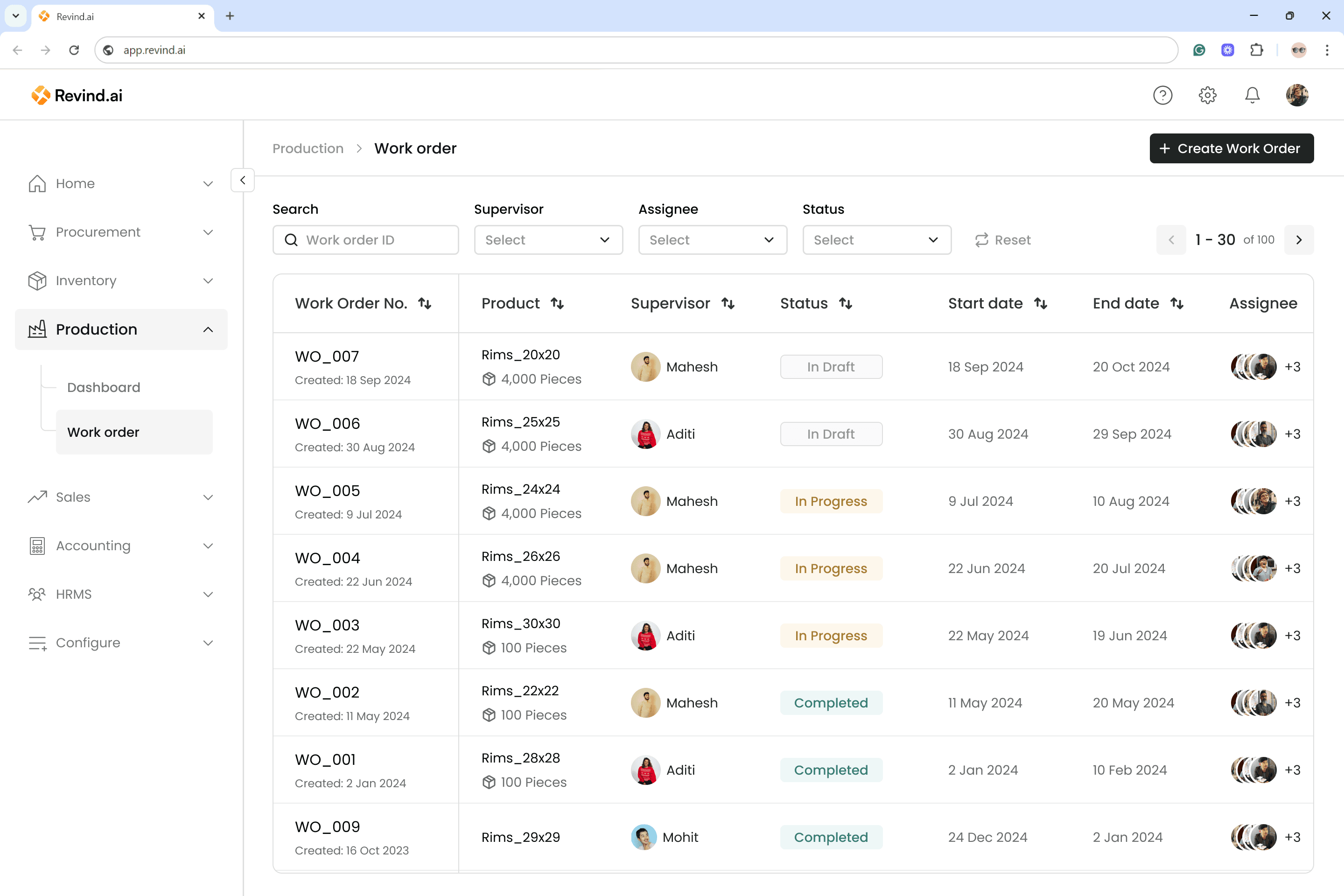
This screen is the first page a user can see after entering Work order via Production module.
Here we decided to provide the user with list of all the previous orders and sort them via creation date on default.
Key features of this screen involves the Status of order, Assignee, Order Timelines and an intuitive CTA.
Once a user decide to start creating a new work order they can click on “Create Work Order” select a sales order they want to produce the item for.
This screen is the first page a user can see after entering Work order via Production module.
Here we decided to provide the user with list of all the previous orders and sort them via creation date on default.
Key features of this screen involves the Status of order, Assignee, Order Timelines and an intuitive CTA.
Once a user decide to start creating a new work order they can click on “Create Work Order” select a sales order they want to produce the item for.
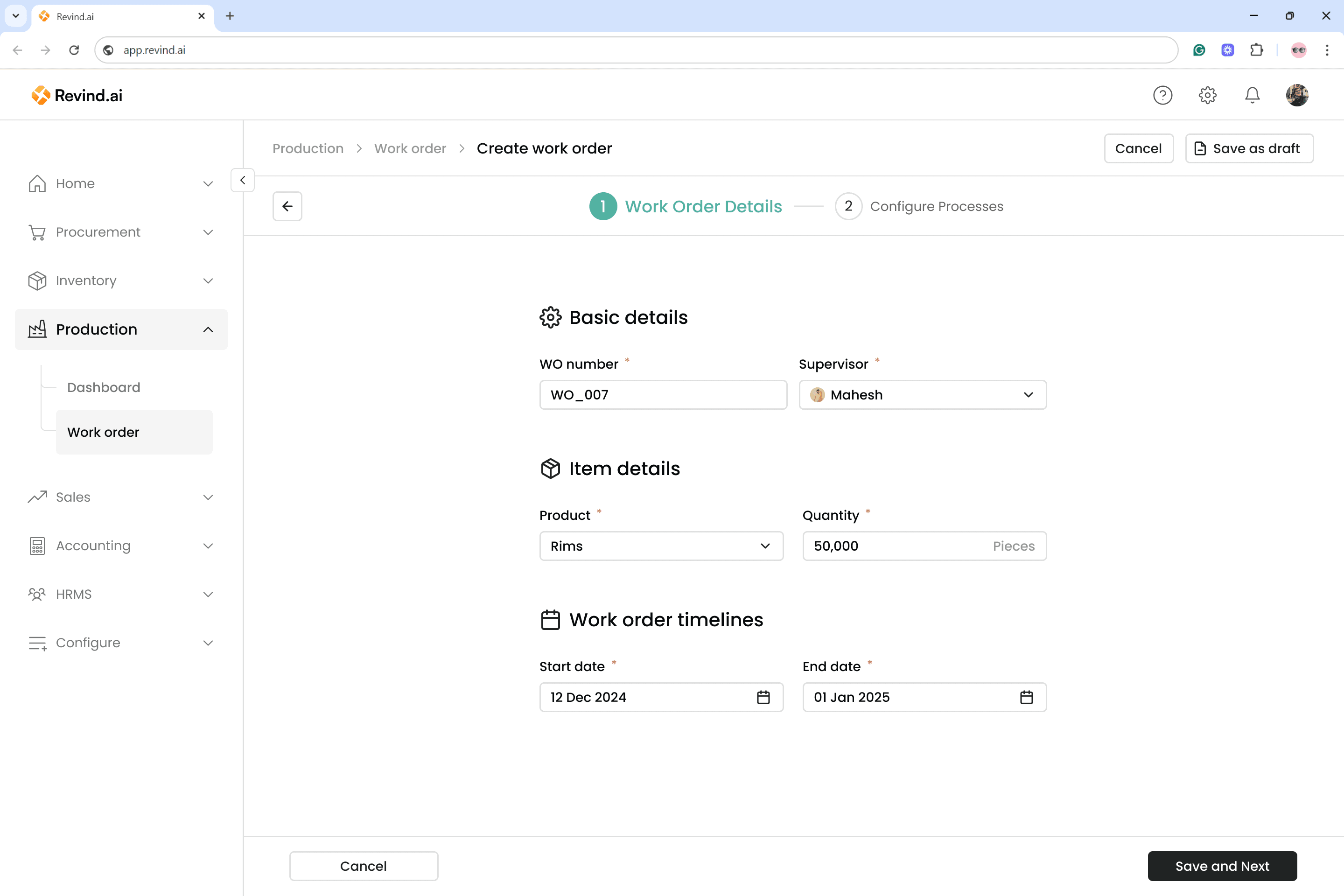
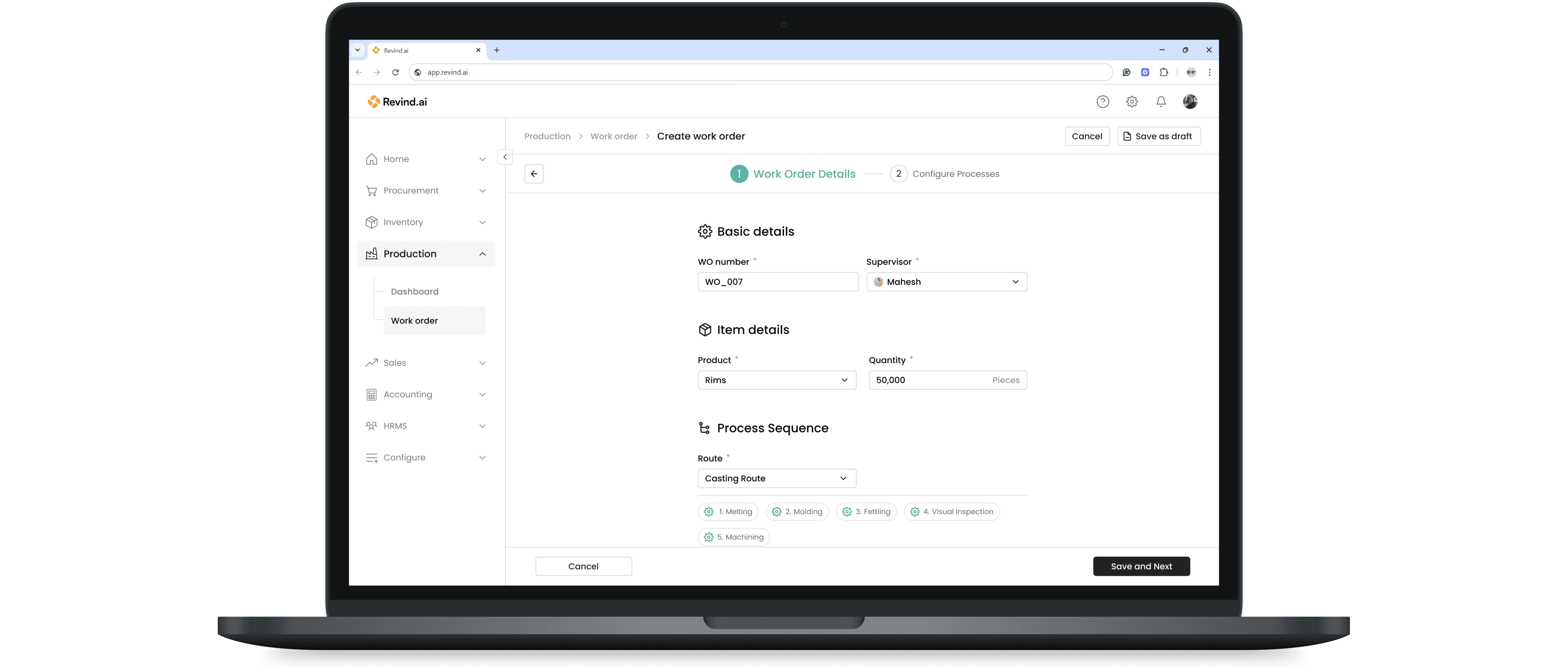
Work order creation step 1
Work order creation step 1
This is the first step of work order creation. To reduce manual data entry, several fields are auto-filled:
Order Number: A sequential number automatically generated by Revind.
Supervisor: Typically the user who is creating the work order.
Product and Quantity: Automatically fetched from the linked sales order created in Revind.
This is the first step of work order creation. To reduce manual data entry, several fields are auto-filled:
Order Number: A sequential number automatically generated by Revind.
Supervisor: Typically the user who is creating the work order.
Product and Quantity: Automatically fetched from the linked sales order created in Revind.
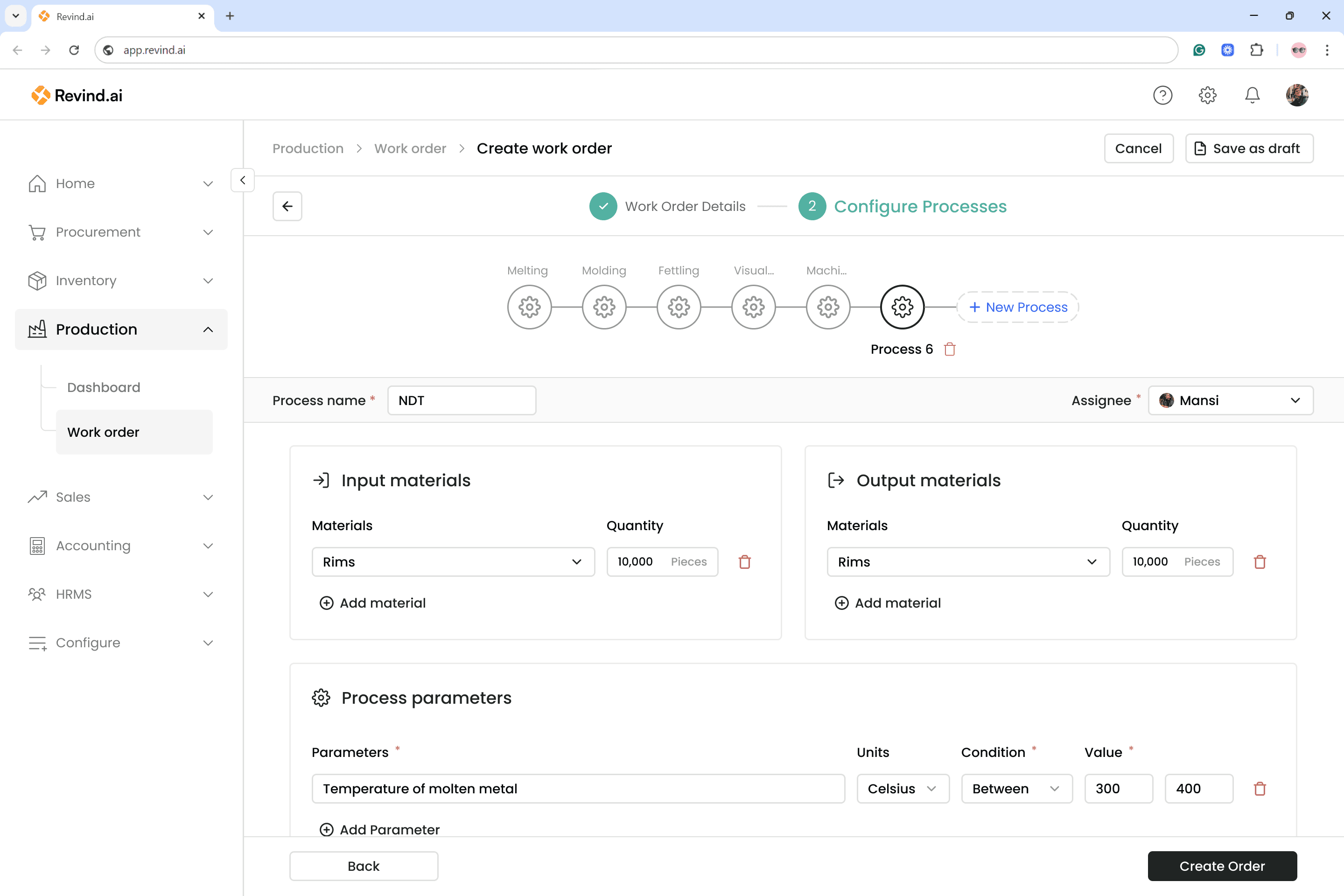
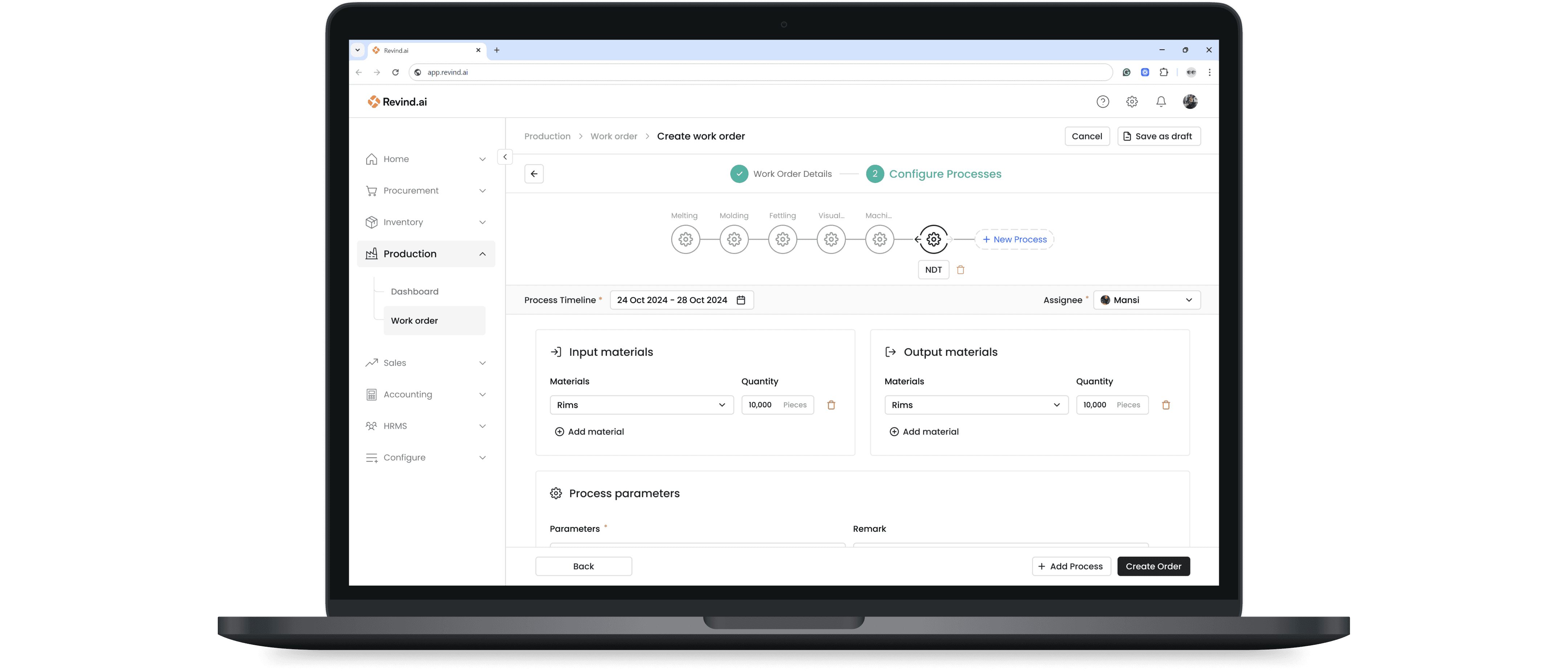
Work order creation step 2
Work order creation step 2
In the second step, the user can create the production plan using these features:
New Process: Add a new step to the plan and define how the process needs to be carried out.
Input/Output Material and Process Parameters: Every process has an input that is transformed into an output under certain conditions. This analogy is applied here.
The user can define any number of processes with a high level of detail on how each operation should be performed.
In the second step, the user can create the production plan using these features:
New Process: Add a new step to the plan and define how the process needs to be carried out.
Input/Output Material and Process Parameters: Every process has an input that is transformed into an output under certain conditions. This analogy is applied here.
The user can define any number of processes with a high level of detail on how each operation should be performed.
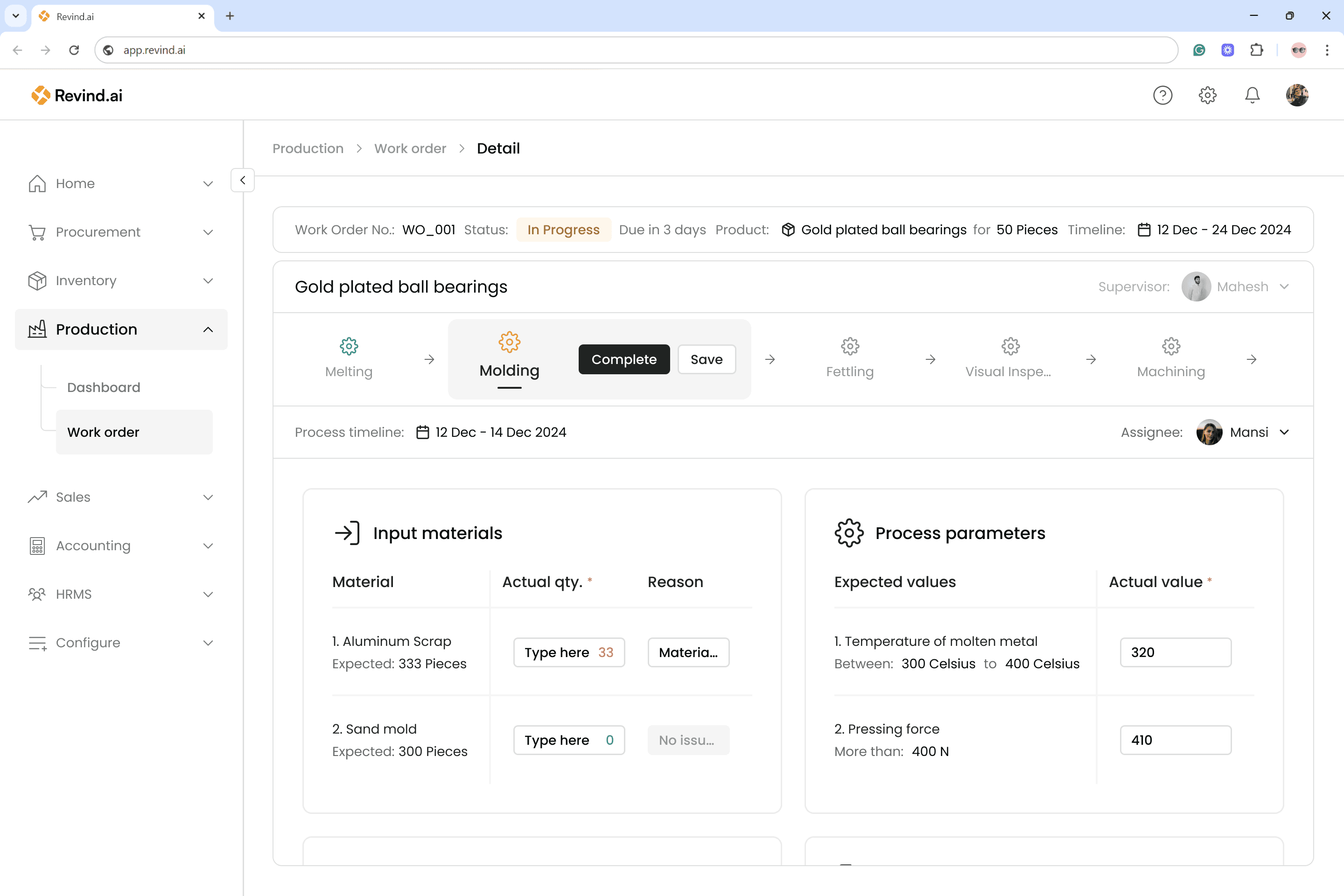
Work ordeexecutionr
Work ordeexecutionr
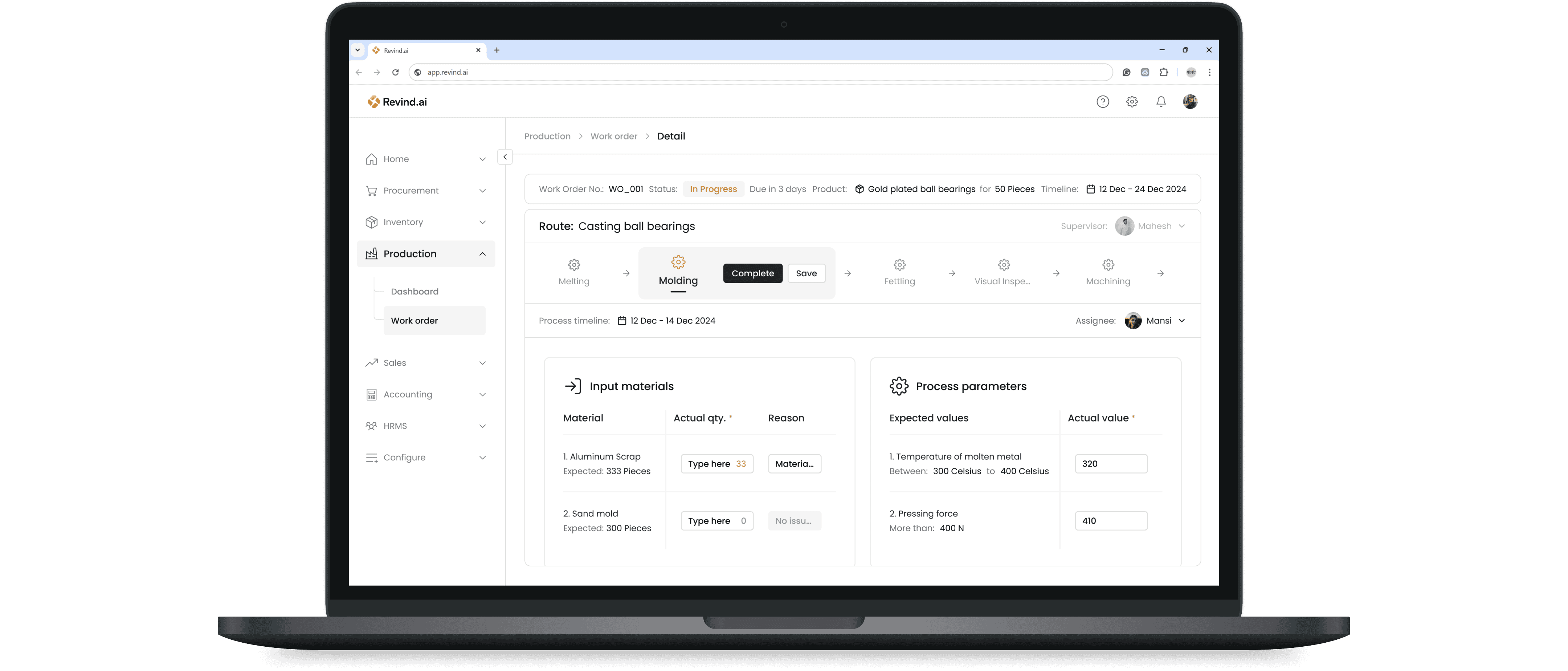
Once the work order is created, it can be used to start tracking progress.
Each process is executed by the assignee assigned to it. Assignees can refer to all the details and instructions provided by the supervisor.
After completing their process successfully, the assignee enters the required data and marks the process as complete.
The next process is then triggered for the next respective assignee.
This chain continues until all processes are completed and the work order is fully closed.
Once the work order is created, it can be used to start tracking progress.
Each process is executed by the assignee assigned to it. Assignees can refer to all the details and instructions provided by the supervisor.
After completing their process successfully, the assignee enters the required data and marks the process as complete.
The next process is then triggered for the next respective assignee.
This chain continues until all processes are completed and the work order is fully closed.
Testing
Testing
After completing the first level of designs in Figma, we began testing with some of our customers as well as people from different departments. I prepared an interactive Figma prototype, which helped us identify what worked and what didn’t—ultimately saving significant development time.
After completing the first level of designs in Figma, we began testing with some of our customers as well as people from different departments. I prepared an interactive Figma prototype, which helped us identify what worked and what didn’t—ultimately saving significant development time.
Goal 1:
Goal 1:
Can a user quickly create a workorder in one go?
Can a user quickly create a workorder in one go?
Goal 2:
Goal 2:
Can user configure process to create complex flows?
Can user configure process to create complex flows?
Goal 3:
Goal 3:
Does the user get stuck anywhere or find anything confusing
Does the user get stuck anywhere or find anything confusing
Goal 4:
Goal 4:
Can the users track each workorders progress?
Can the users track each workorders progress?
Scenario & Result
Scenario & Result
Revind has introduced the “Work Orders” feature to manage all your production needs. You can now create production plans based on upcoming sales orders from the sales team and also track the progress of previous work orders in real time.
Revind has introduced the “Work Orders” feature to manage all your production needs. You can now create production plans based on upcoming sales orders from the sales team and also track the progress of previous work orders in real time.
Goal 1:
Goal 1:
Can a user quickly create a workorder in one go?
Can a user quickly create a workorder in one go?
5/5
5/5
Users like the list page UI and successfully clicked on “Create Work Order” button.
Users like the list page UI and successfully clicked on “Create Work Order” button.
5/5
5/5
Users were able to complete the work order flow and tag it to an existing sales order.
Users were able to complete the work order flow and tag it to an existing sales order.
4/5
4/5
Users felt that workorder timeline should not be on first page... rather per process.
Users felt that workorder timeline should not be on first page... rather per process.
Goal 2:
Goal 2:
Can user configure process to create complex flows?
Can user configure process to create complex flows?
5/5
5/5
Users created the production flow successfully.
Users created the production flow successfully.
5/5
5/5
Users like the flow and the UI.
Users like the flow and the UI.
3/5
3/5
Found it redundant work to create the same process sequence again.
Found it redundant work to create the same process sequence again.
5/5
5/5
There were too many fields in process parameters to fill.
There were too many fields in process parameters to fill.
Goal 3:
Goal 3:
Does the user get stuck anywhere or find anything confusing
Does the user get stuck anywhere or find anything confusing
5/5
5/5
No method to change the sequence of process... had to delete and create again.
No method to change the sequence of process... had to delete and create again.
2/5
2/5
Missed the “New process” button and clicked on “Create Order” to move to next step.
Missed the “New process” button and clicked on “Create Order” to move to next step.
Goal 4:
Goal 4:
Can the users track each workorders progress?
Can the users track each workorders progress?
5/5
5/5
Were able to find the current progress on each work order.
Were able to find the current progress on each work order.
4/5
4/5
Users said, they still had to go in detail of work order to find there tasks.
Users said, they still had to go in detail of work order to find there tasks.
Key takeaways
Key takeaways
4/5
4/5
Needed process timelines for assignee.
Needed process timelines for assignee.
Remove work order timeline and add to process level.
Remove work order timeline and add to process level.
5/5
5/5
Felt there are too many fields for parameters
Felt there are too many fields for parameters
Keep 2 field. 1st for parameter name 2nd for remark.
Keep 2 field. 1st for parameter name 2nd for remark.
5/5
5/5
Felt creating and rearranging process sequence was hard
Felt creating and rearranging process sequence was hard
Allow rearranging and saving sequence as template (Route).
Allow rearranging and saving sequence as template (Route).
4/5
4/5
Hard to find assignee tasks
Hard to find assignee tasks
Create a separate “My Task” section
Create a separate “My Task” section
Resulting Revisions
Resulting Revisions
I gathered all the observations from the different testing rounds and compiled them into a list of actionable feedback items. Based on this list, I refined and updated the designs. Below are the iterations and improvements that were made.
I gathered all the observations from the different testing rounds and compiled them into a list of actionable feedback items. Based on this list, I refined and updated the designs. Below are the iterations and improvements that were made.
Work order details enhancement
Work order details enhancement
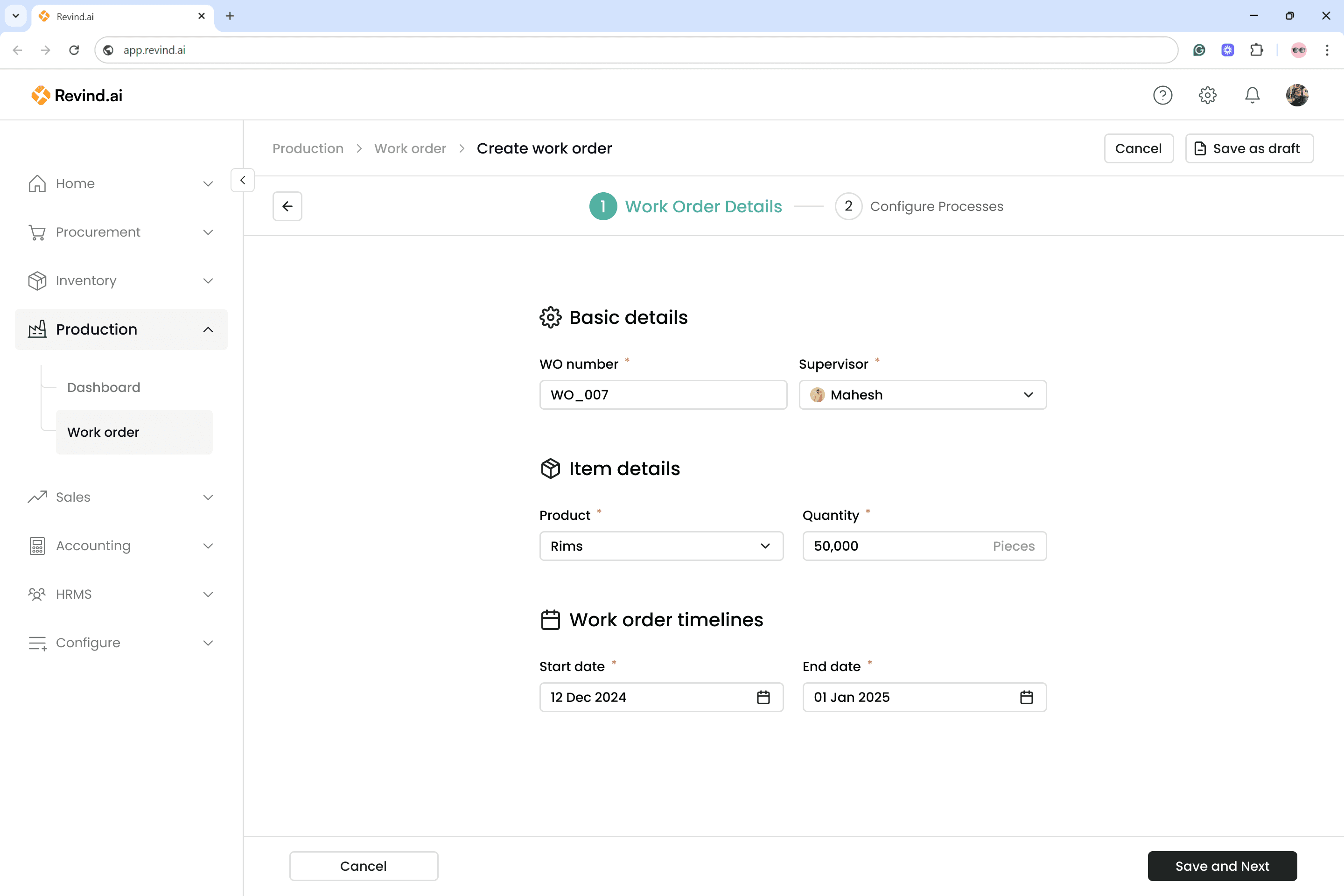
Before
Before
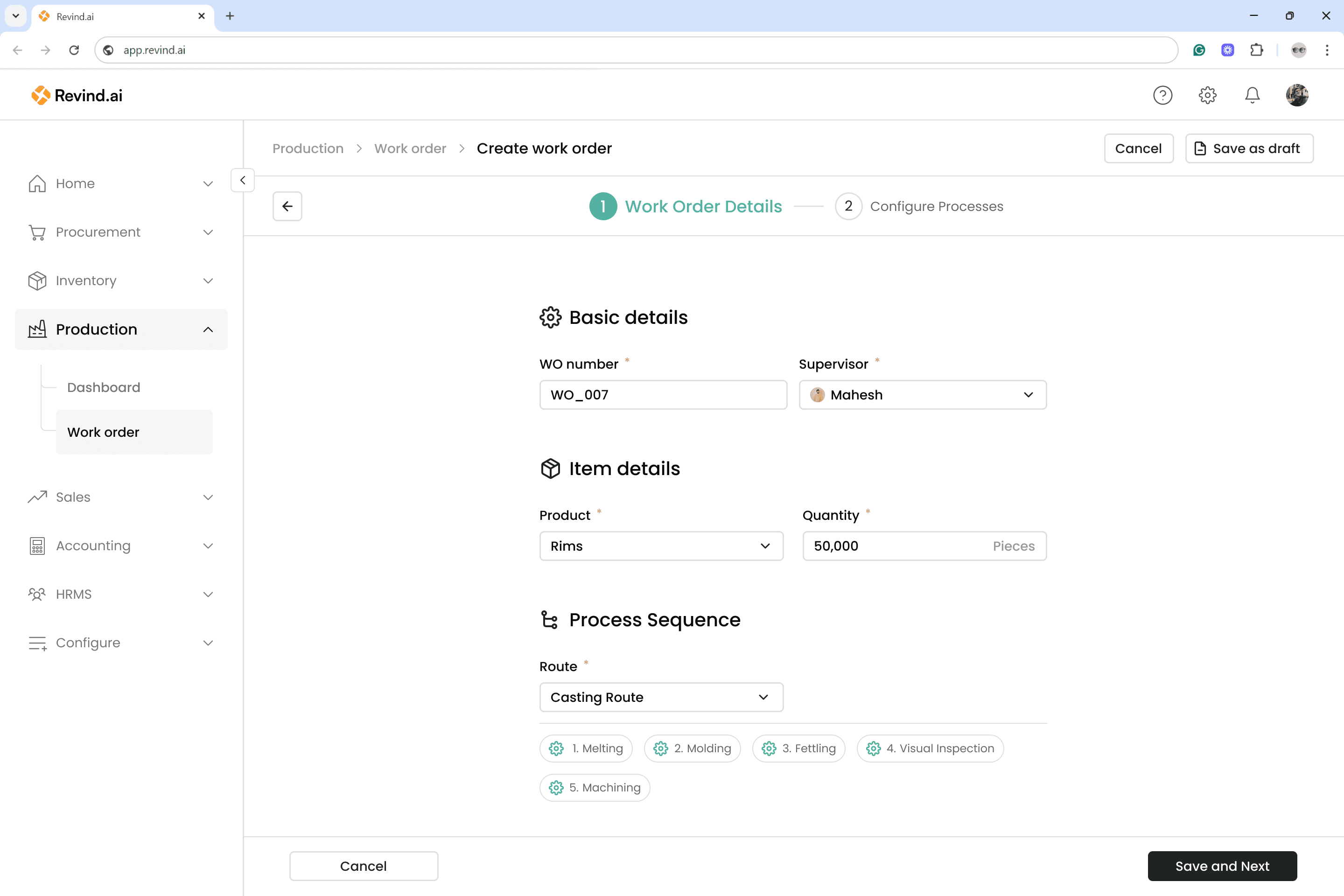
After
After
We removed the previous Timeline section and introduced a Process Sequence view. Now, users can simply attach a predefined route that was created in earlier work orders, instead of building a sequence from scratch. This significantly reduces time and repetitive effort during work order creation.
To ensure transparency and avoid confusion, the selected route is displayed with its exact step-by-step process sequence, so users can clearly verify which workflow is being added.
We removed the previous Timeline section and introduced a Process Sequence view. Now, users can simply attach a predefined route that was created in earlier work orders, instead of building a sequence from scratch. This significantly reduces time and repetitive effort during work order creation.
To ensure transparency and avoid confusion, the selected route is displayed with its exact step-by-step process sequence, so users can clearly verify which workflow is being added.
Configure Process enhancements
Configure Process enhancements
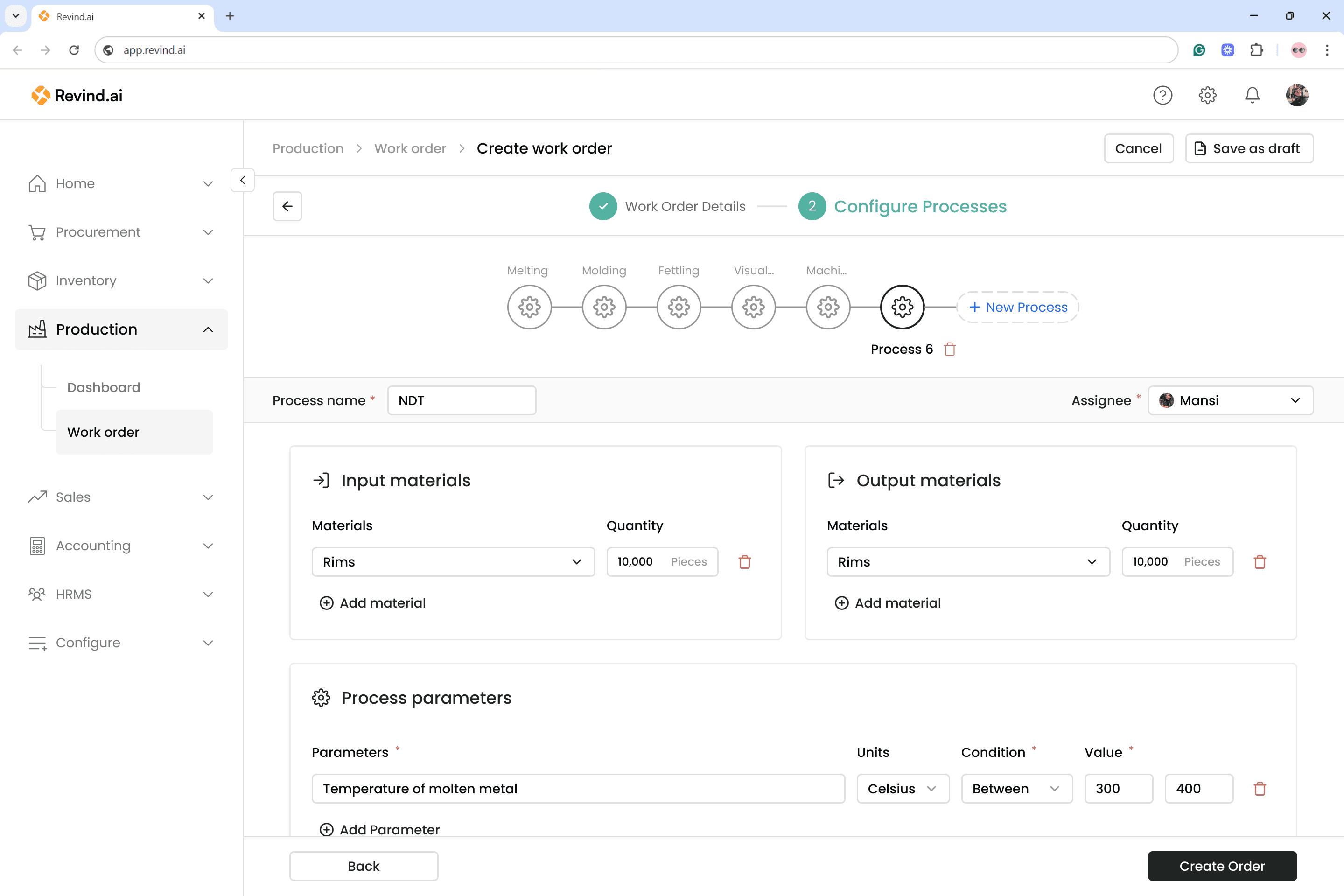
Before
Before
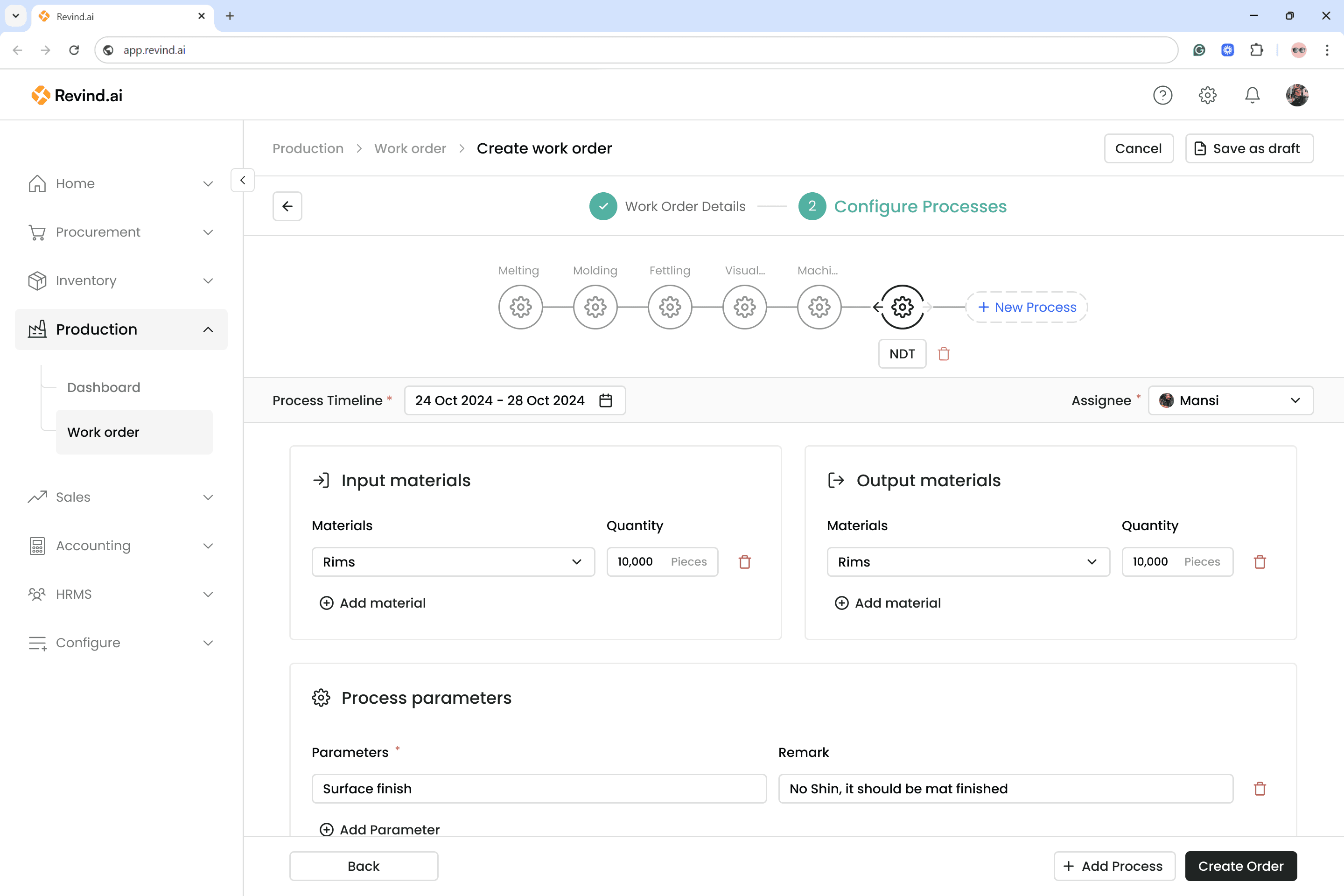
After
After
Several changes were made to enhance clarity and reduce effort during work order creation:
Replaced “Process Name” with “Process Timeline”
Users can now assign a deadline to each process. The system can automatically calculate the overall project timeline using the start date of the first process and the end date of the last. The process name has been moved next to the gear icon in the Process Sequence section to keep the layout clean.
Added “Add Process” button beside “Create Order”
Previously, users overlooked the button due to its placement. Positioning it next to the primary action ensures better visibility and prevents missing a crucial step.
Reduced process parameters from 5 fields to 2
By narrowing down only to the essential inputs, the process creation time has significantly decreased, making the entire work order flow faster and more efficient.
Users can now rearrange processes effortlessly.
The new left/right arrows allow shifting steps up or down in the sequence, ensuring faster workflow organization and eliminating repetitive work.
Several changes were made to enhance clarity and reduce effort during work order creation:
Replaced “Process Name” with “Process Timeline”
Users can now assign a deadline to each process. The system can automatically calculate the overall project timeline using the start date of the first process and the end date of the last. The process name has been moved next to the gear icon in the Process Sequence section to keep the layout clean.
Added “Add Process” button beside “Create Order”
Previously, users overlooked the button due to its placement. Positioning it next to the primary action ensures better visibility and prevents missing a crucial step.
Reduced process parameters from 5 fields to 2
By narrowing down only to the essential inputs, the process creation time has significantly decreased, making the entire work order flow faster and more efficient.
Users can now rearrange processes effortlessly.
The new left/right arrows allow shifting steps up or down in the sequence, ensuring faster workflow organization and eliminating repetitive work.
Added new sections
Added new sections
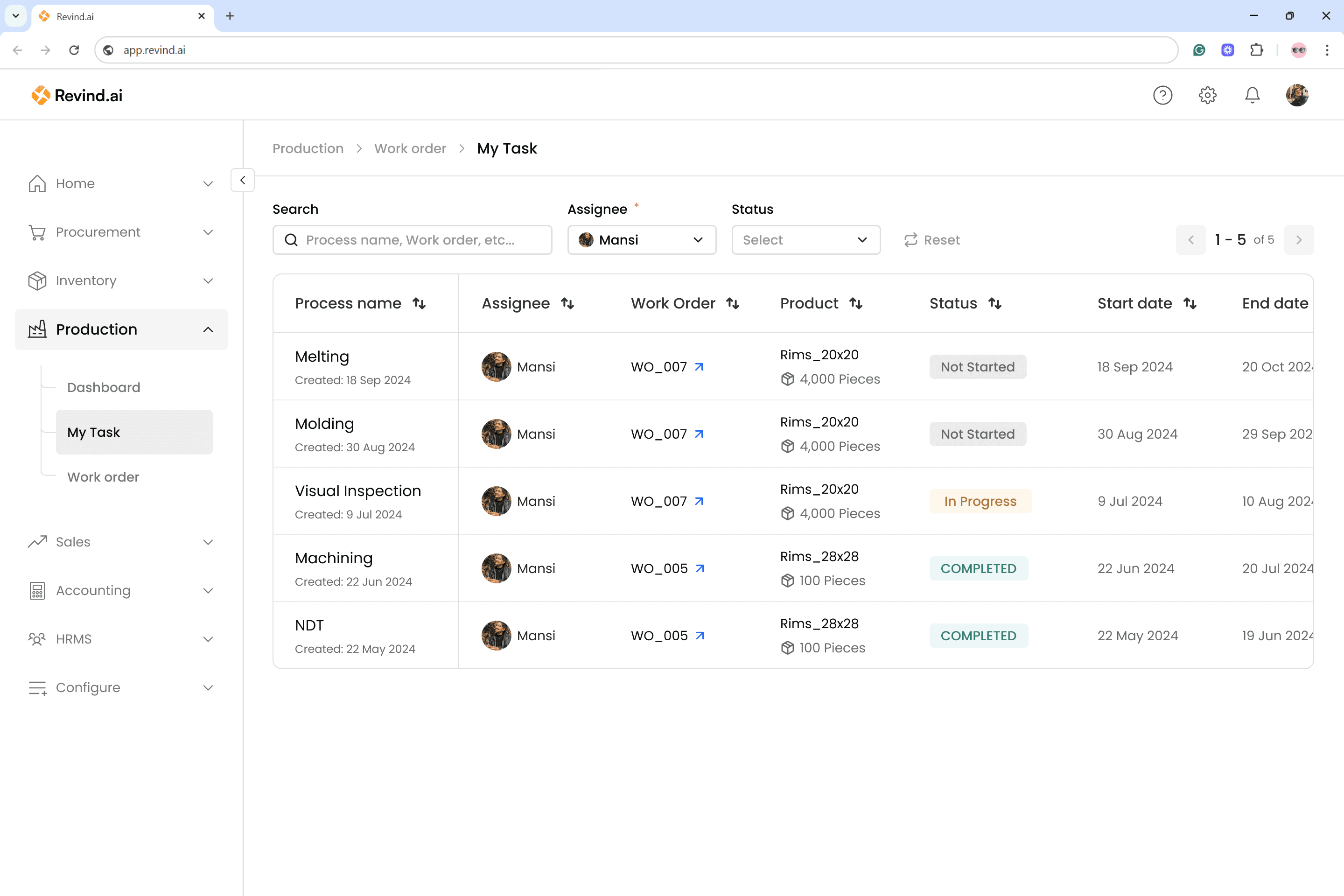
My Task
My Task
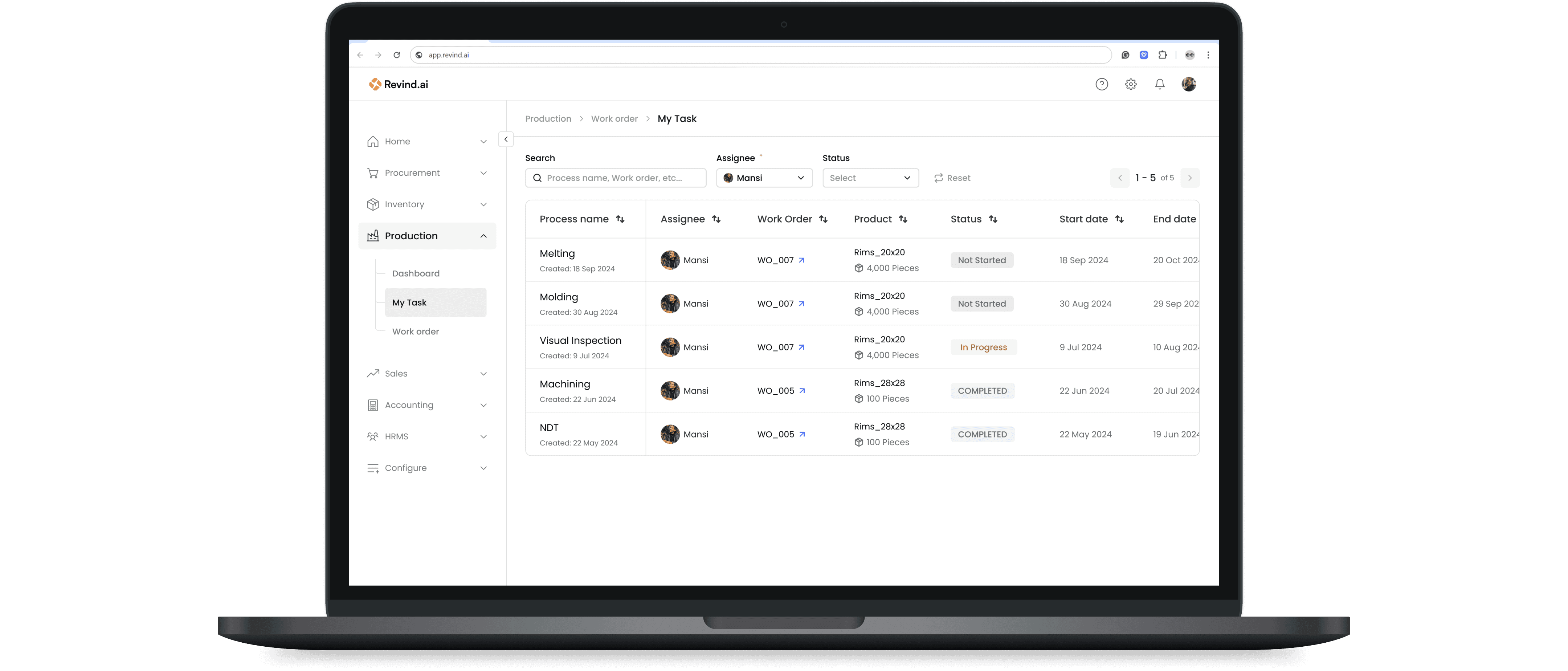
We added a My Tasks section to give assignees a direct view of all their pending tasks.
Previously, users had to apply the Assignee filter in the Work Order list to see the work orders that contained their tasks. Even then, it did not provide clarity on:
What tasks were assigned to them
How many tasks were pending
The deadlines and schedule for those tasks
With the new My Tasks section, assignees can now effortlessly view:
All tasks assigned to them
Deadlines and priority
The corresponding work order each task belongs to
This helps users stay organized, plan their work better, and complete tasks on time.
We added a My Tasks section to give assignees a direct view of all their pending tasks.
Previously, users had to apply the Assignee filter in the Work Order list to see the work orders that contained their tasks. Even then, it did not provide clarity on:
What tasks were assigned to them
How many tasks were pending
The deadlines and schedule for those tasks
With the new My Tasks section, assignees can now effortlessly view:
All tasks assigned to them
Deadlines and priority
The corresponding work order each task belongs to
This helps users stay organized, plan their work better, and complete tasks on time.
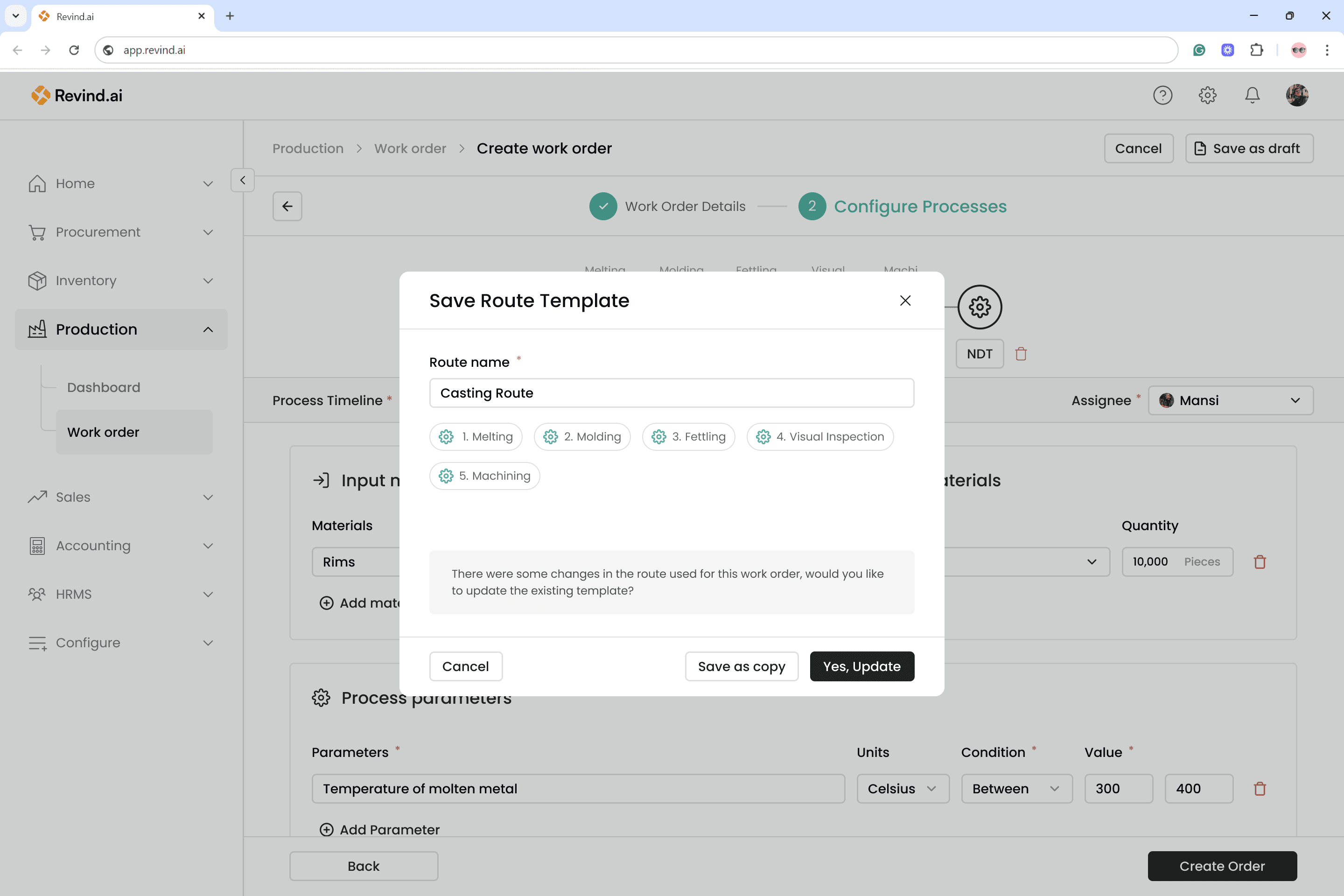
Save as Route
Save as Route
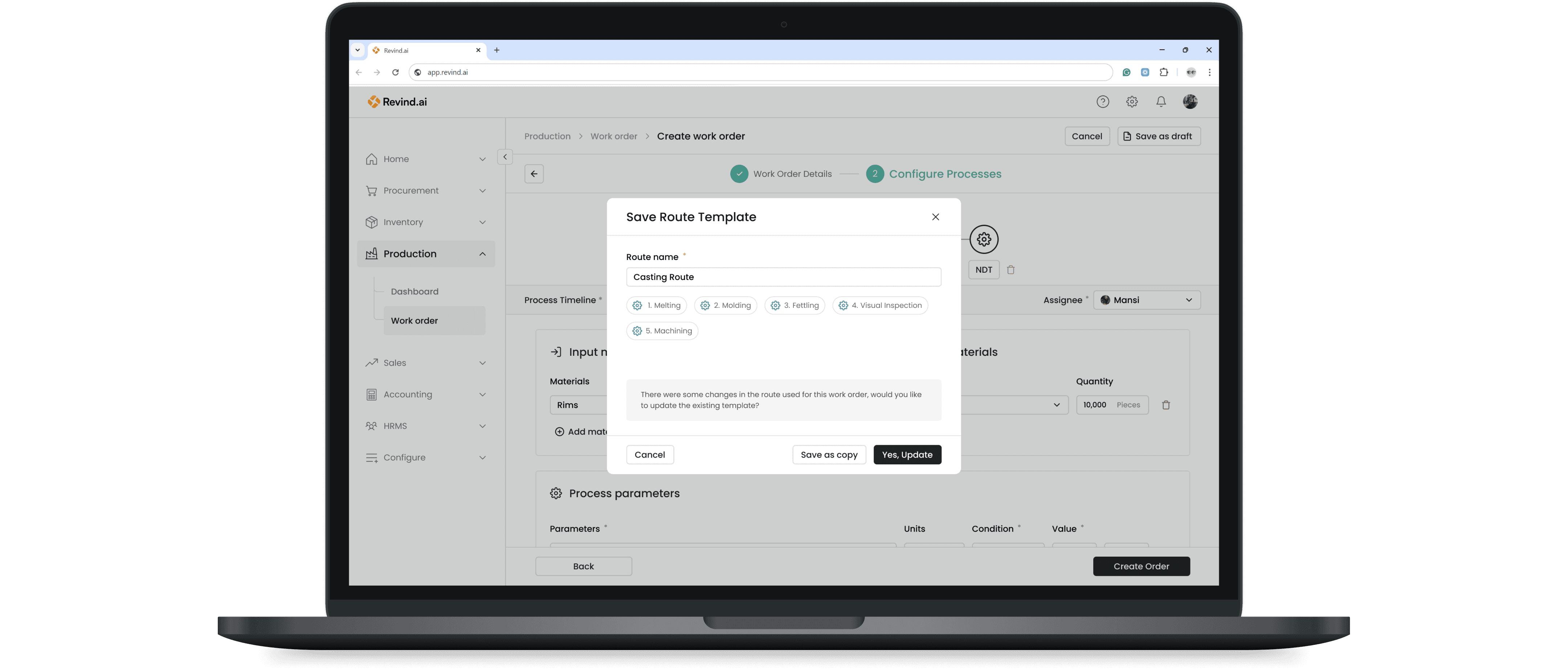
When the user clicks “Create Order,” a confirmation modal appears asking whether they want to save the route. The user can either save the current sequence as a new route template or update the existing route that was selected in the first step.
When the user clicks “Create Order,” a confirmation modal appears asking whether they want to save the route. The user can either save the current sequence as a new route template or update the existing route that was selected in the first step.
Final UI
Final UI
Impact
Impact
With the deployment of the first version of Work Orders, we received a strong and positive response. New users appreciated the UI and found the overall experience simple and intuitive. Some of the key metrics we tracked include:
With the deployment of the first version of Work Orders, we received a strong and positive response. New users appreciated the UI and found the overall experience simple and intuitive. Some of the key metrics we tracked include:
Reduced work order (WO) creation time from 1–2 days to 60–80 minutes.
Reduced work order (WO) creation time from 1–2 days to 60–80 minutes.
Reduced WO execution time by an average of 2 days.
Reduced WO execution time by an average of 2 days.
Secured 15 new enterprise customers.
Secured 15 new enterprise customers.
Increased app engagement by 25%.
Increased app engagement by 25%.
“Now I don’t need to double-check everything manually.”
“Now I don’t need to double-check everything manually.”
“Breaking the process into steps makes it less mentally exhausting.”
“Breaking the process into steps makes it less mentally exhausting.”
“I don’t need to re-explain tasks to operators anymore.”
“I don’t need to re-explain tasks to operators anymore.”
“Now I know exactly who is working on what.”
“Now I know exactly who is working on what.”
Next Steps
Next Steps
Users have also requested features such as splitting a work order into multiple steps, viewing assignee schedules with a Gantt chart, and tracking work order timelines visually. Since these were not top priorities for the initial launch, they were excluded from the first release but will be considered in future updates.
We also plan to integrate this tool with other modules, including E-Way Bills, Invoices, Inventory, and the Order Management System.
We will continue to test the feature, collect customer feedback, and refine the workflow to ensure a seamless production experience.
Users have also requested features such as splitting a work order into multiple steps, viewing assignee schedules with a Gantt chart, and tracking work order timelines visually. Since these were not top priorities for the initial launch, they were excluded from the first release but will be considered in future updates.
We also plan to integrate this tool with other modules, including E-Way Bills, Invoices, Inventory, and the Order Management System.
We will continue to test the feature, collect customer feedback, and refine the workflow to ensure a seamless production experience.
Lets connect
Lets connect
mayankuxdes@gmail.com
www.mayankux.com
Thank You
For Reading
Thank You
For Reading
Thank You
For Reading